The target is already set.
You open Tarvo at the gym, and every exercise shows what you lift today. Weight and reps, set by set. One check, and the set is done.
Last time82.5 kg × 7two more were left
Today82.5 kg × 78one more rep

Strength training app for iPhone and Apple Watch
Tarvo works out what you lift today from your last session and raises it week by week. You just check it off.
One email when Tarvo launches. Nothing else. Privacy

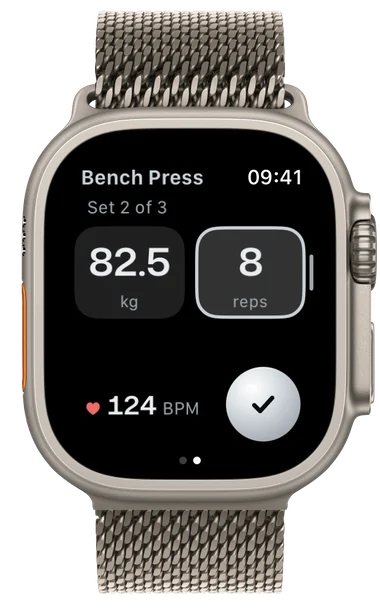
You open Tarvo at the gym, and every exercise shows what you lift today. Weight and reps, set by set. One check, and the set is done.
First the reps go up, then the weight. If it gets too heavy, Tarvo steps back. Every target comes with a reason you can read.
Bench press, the last eight push days
How Tarvo progressesEnter what you did and how many more you could have done. Tarvo works out your next target with the same rule as the app.
Target 82.5 kg × 8 · two more were possible, one more rep
How many more could you have done?
All on target, with two left. So the same weight, one more rep.
Your iPhone stays in the locker. The watch shows the target and times your rest, and so does the Lock Screen.
How many more could you have done? Your answer decides whether the weight goes up next time or the reps first.

Tarvo spots a personal best the moment you check off the set.

New personal best
Bench press 82.5 kg × 9, one more than planned.
Bring your own plan, pick a starter plan or let Tarvo build one. Either way, Tarvo sets the targets.

Bring your training over from Hevy or Strong. Tarvo recognizes your exercises and sets real targets from day one.
No account, no ads. Export always works, even without a subscription.
Data
Everything is unlocked for 14 days. We’ll tell you two days before it ends. Then a yearly or monthly subscription.
€0for 14 days
Then yearly or monthly. We’ll announce the price at launch.
One email when Tarvo launches. Nothing else. Privacy
Tarvo is a strength training app for iPhone and Apple Watch. It sets weight and reps for every set from the previous session and raises them week by week.
No. Pick a starter plan or let Tarvo build one. If you bring your own, Tarvo sets the targets for it.
Yes. Everything works with just your iPhone. The watch is an extra.
Yes. Tarvo imports your history and sets fitting targets from your first workout.
It stays on your iPhone and in your iCloud. No account, no ads. Export works any time, even without a subscription.
Soon. Sign up and you’ll get exactly one email at launch.


One email when Tarvo launches. Nothing else. Privacy